INTERFACE ENGINEERING
A desktop that preserves the work.
A shared workspace for tools, records, and documents—with window behavior that keeps the work intact.
The problem
worth solving.
Business work rarely fits into one view. A person may need a customer record, an active project, and a document at the same time. Repeated navigation breaks that context.
Owner and architect of Nexus RMM. This study focuses on the desktop shell and the reusable window behavior supporting it.
IMPLEMENTATION STUDY / NEXUS
The window moves.
The work stays.
A desktop metaphor earns its place when it preserves unfinished work. These are the lifecycle boundaries implemented in the original Nexus window component.
type WindowState = {
  appId: AppId;
  normal: Rectangle;
  maximized: boolean;
  minimized: boolean;
};

// Illustrative presentation transition.
minimize(window) => ({
  ...window, minimized: true
})
Minimizing changes visibility. Maximizing changes presentation. Neither operation needs to replace the document.
Minimize an unfinished document
Hide the application without unmounting its editing session.
Maximize, then restore
Keep the normal rectangle separate from the display mode.
Shrink the viewport
Constrain the restored rectangle to the available workspace.
Reject an unsaved-draft close
Keep the working context open; return focus only after an accepted close.
Dismiss a nested menu with Escape
Let the inner control consume the event before the outer window.
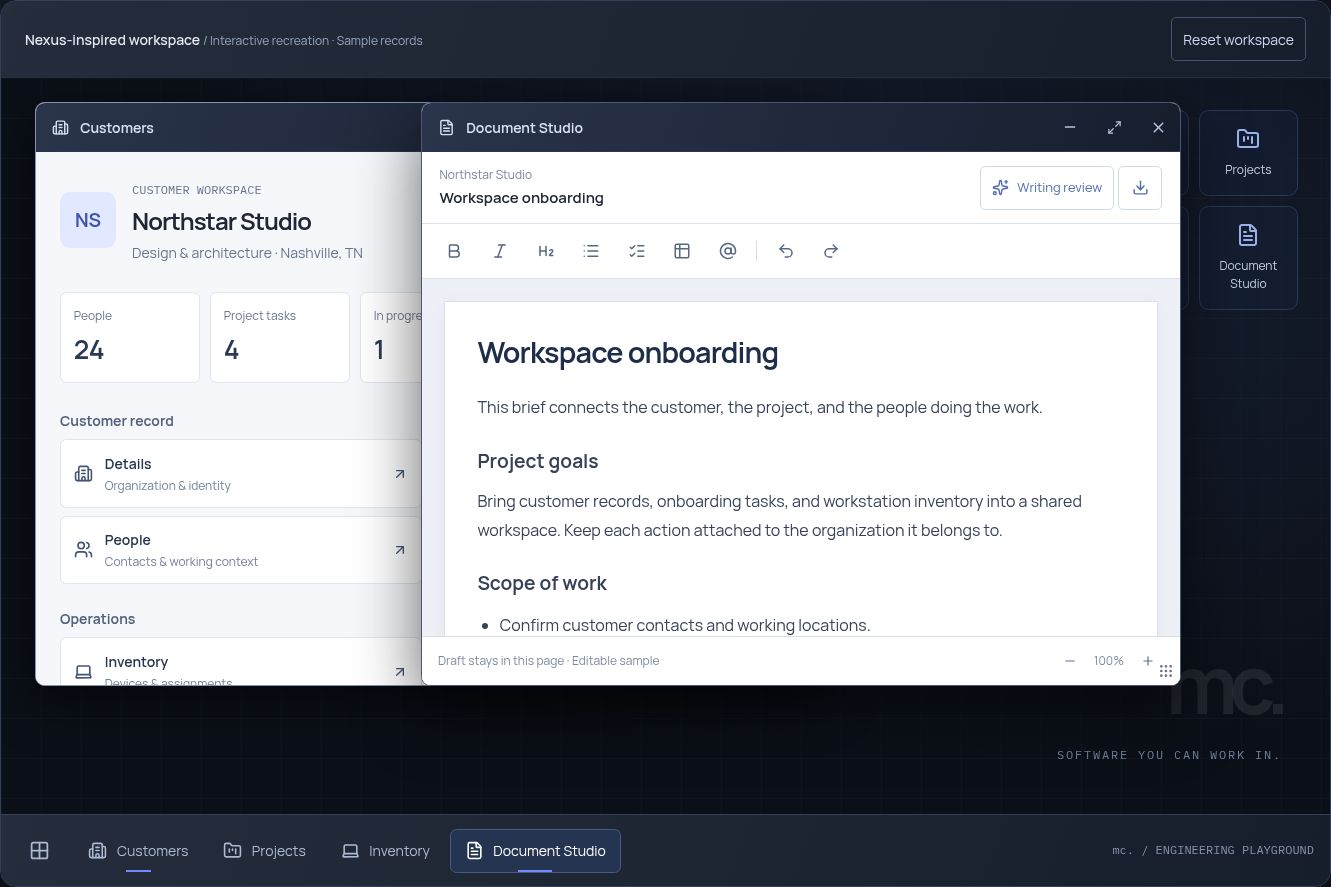
Try the demonstrated behavior. Open Document Studio, edit a paragraph, minimize it, then reopen it. Maximize and restore on a larger screen. The document and window arrangement remain.
Source and demonstration scope
Examined in Nexus commit 8233634: DockPanel.tsx and its companion stylesheet. The original implementation separates normal geometry, fullscreen presentation, mounted content and the close callback.
This portfolio recreates the minimize/restore and geometry behavior with sample records. The source study also describes the original guarded-close and nested Escape handling; those are not presented as features of this smaller recreation. These are observed implementation decisions, not production reliability measurements.
THE ENGINEERING
Decisions behind
the experience.
Give windows their own lifecycle.
Opening, focusing, minimizing, restoring, and closing are distinct operations. Minimized windows remain mounted so a draft can survive the change in view.
Separate position from display mode.
A normal window keeps its position and dimensions while maximized. Restoring returns it to the working arrangement the user established.
Keep the application within reach.
The taskbar acts as a stable return point. A shared launcher and consistent controls give different modules the same interaction language.
TAKE IT FOR A SPIN
See the behavior
for yourself.
- Open several applications and bring one forward.
- Move and resize a window, then maximize and restore it.
- Minimize the document, reopen it, and keep your draft.
The portfolio recreation implements core window and taskbar behavior using fictional records. It is a focused demonstration, rather than the full Nexus runtime.